
Start here · before episode 1
How I use AI, and what Crew is
Every episode in this series says "built with AI" and "built with Crew". This page is the one-time explanation of what that means, so the episodes can get on with the story.
The layers
Four ways I use AI, from a quick question to a team that works for days
Most of the time it's one of the first two. The series is mostly about the third.
Chat
A question, a draft, a translation, a second opinion. Same as everyone.
Coding agent
Claude Code in my editor. It reads the project, edits files, runs the tests. I review every change before it lands.
Crew: a team of personas
Several AI specialists with their own role, memory and tools, working on a shared board, passing work to each other and stopping to ask me.
Always-on helpers
Small automations on a Raspberry Pi at home, reached through Telegram. Some of them are Crew personas with a bot of their own.
Why a team
One chat is a brilliant intern with amnesia
It does everything, remembers nothing between sessions, and has no idea what it should not touch. For a two-hour task that's fine. For a project it isn't. Crew is my answer to three specific problems.
The 3D Model Designer knows my printer is a P1S with a 230 mm bed and that I hate supports. It learned that once. The Game Designer never has to.
A persona gets only the tools its job needs, asks before it runs anything on my computer, and every call is logged with a severity. I decide how much freedom each one gets.
The designer writes a spec and hands it to the modeller. The modeller's result goes back to the designer to check. What needs a human lands in one list.
Tour of Crew
Nine screens, in the order you meet them
Click a step, or use the arrows. These are frames from the app's own intro recording, with my real personas and projects.
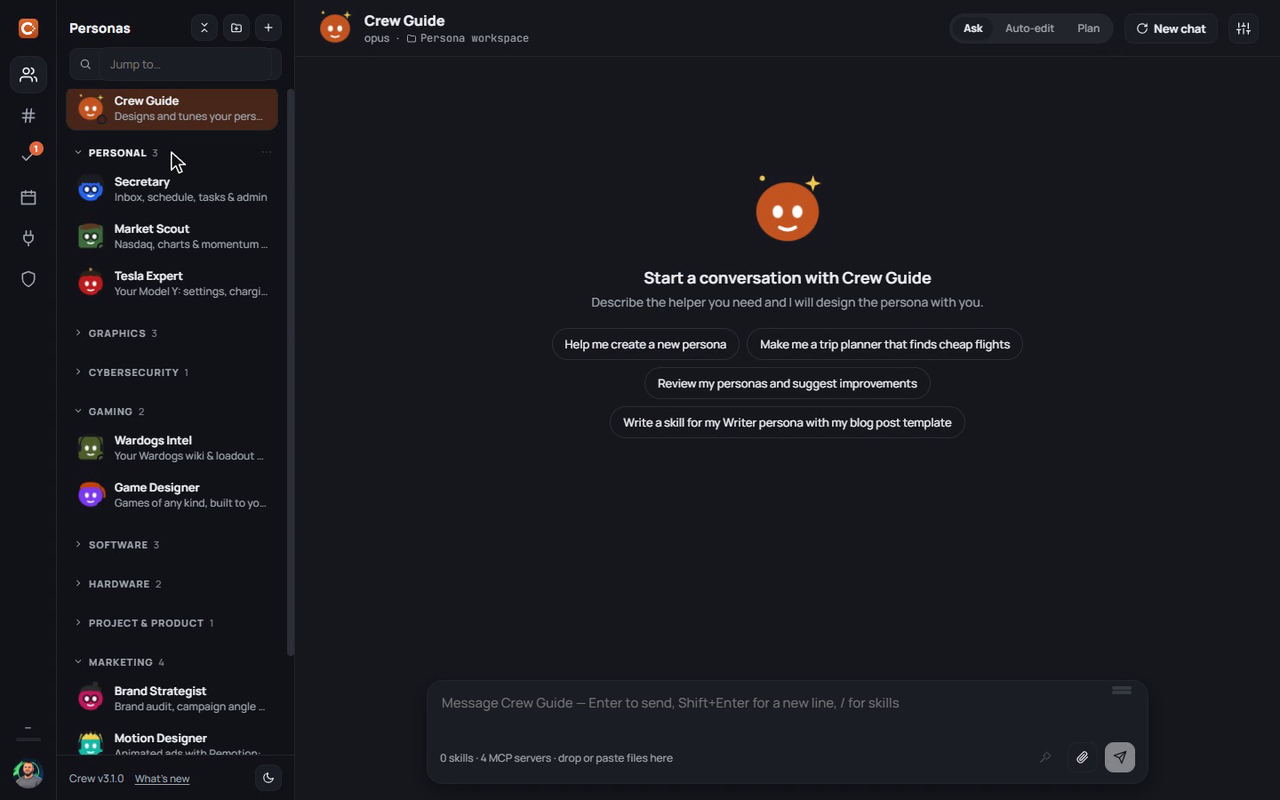
Personas live on the left, grouped into categories like Personal, Gaming or Marketing. Each one is its own Claude session with its own instructions, its own memory, and only the tools its job needs. The Crew Guide sits at the top and is the one persona that makes other personas.
My rules
Four habits that keep this useful instead of exhausting
New personas start in "ask before acting". I loosen it per tool, per persona, once I've seen it behave. Never the other way round.
Constraints, the printer, the audience, what "done" looks like. The quality of the result is set in the first message, not in the follow-ups.
Anything with a web address, anything touching secrets, anything that writes outside the project is marked high in the audit log, and I look.
Print it, play it, run it. A simulation checks the rules you wrote. A four-year-old checks the rules you meant. Every episode has a "where I stepped in" section for this reason.
Facts